
















Open All modules and pick one to read what it does.
Seavo Nautiq is under active development
Everything on board, accounted for
Shaped around a real working vessel and the routines you already have on board.
Inventory
Seavo Nautiq
Maritime software for a vessel’s crew, inventory and operations — the whole workspace in a browser.
Everything opens from one hub. From there you reach the three sides of the working day — inventory, crew coordination and operations — each a short step from the last, and none of them a separate system to sign in to.
Think of that hub as a motherboard, and the parts you work in as components wired into it. What you register in one place is already known to the others, so nothing is entered twice and nothing has to be carried across by hand.
An internal radar, built by the people who sail her
Between them they cover the working day of a vessel, and what they build up is an internal radar — not one handed to you finished, but one assembled by the shipping company and the crew on board. The picture it shows is the picture you put into it.
Used well, that is a digitized control system on board: not a rigid operating system dictating how the work is done, but a toolkit you reach for exactly as you see fit.
So how do you build the overview you want?
The same way it has always been done on board, only digitally. The structure bends to the vessel rather than the vessel to the structure — and the access framework draws the lines, so the owner, the officers and the crew each hold the part of the picture that is theirs to hold.
Those lines are drawn on more than who answers for which items on board. Seavo Nautiq is built as a safety and welfare management system as much as an operational one, and a system like that keeps a record of itself.
Whether you are putting together a crew list for a voyage, planning how a hold is stowed, or writing up research, the work leaves a trace. It can be found again and carried forward — into the next voyage, the next inspection, the next crew — in a few clicks rather than an afternoon spent looking for the folder it went into.
What exactly is this software, and which vessels is it suited for?
This website has been up for some time now. It all started in 2024, and the platform is still under active development. Seavo Nautiq began as a small platform for managing inventory and supplies on large fishing vessels — not a generic stock system. It is built in distinct classes, with tracking across several locations and tagging of every item:
 OfficeOffice supplies and consumables
 EquipmentEquipment and asset tracking
 Parts & ToolsThe tool crib and spare parts
 ProvisionsFood, water and crew supplies
 SafetyGear for emergencies and search and rescue
 MedicineThe medicine chest and other health items
Each class has its own page, with tables and tools organised for it. The focus is still on separate classes, and that is what makes the platform suitable for most vessels: fishing vessels, cargo vessels and specialised vessels alike.
Everything on board, and everything that happens there
Seavo Nautiq has since grown into a major platform that accounts for everything on board and everything that happens there. At its core lives a data governance system. It builds the access profiles, and it holds the chain every policy walks to answer one question: may this person do this, here?
The foundation: the data model
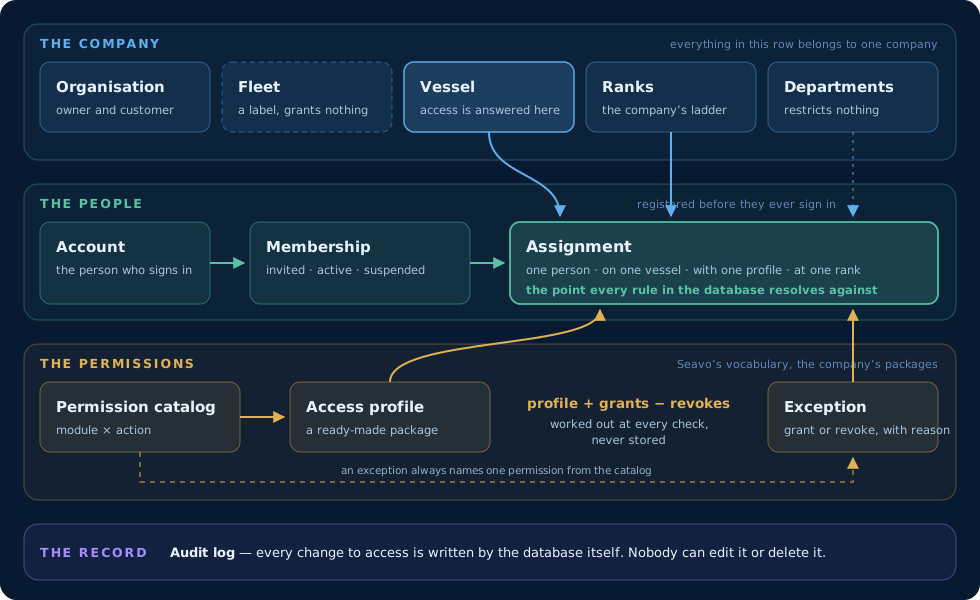
The data model, in four layers.
Read it from the top down. The company sits at the top of every access question and owns its vessels, its rank ladder and its departments. A fleet only groups vessels and gives no access of its own, and a department describes where a person works without restricting anything. The vessel is what counts: permissions are answered per vessel, so access on one hull grants nothing on another, even inside the same company. The company owner is the single exception, and passes every check.
Then the people. A membership places a person in the company, and it exists before they have an account, so a crew member can be registered and invited before they ever sign in. An assignment puts that person on one vessel, with one access profile, at one rank. It is the point every rule in the database resolves against.
Beneath them, the permissions: the access profile decides what an assignment opens, and an exception adjusts it for one person. At the bottom lies the record. Every change to who may do what is written to an audit log by the database itself, and there is no way to edit or delete it, for anyone — a log that can be rewritten is not a log.
Access profiles and the permission catalog
The permission catalog is the vocabulary the whole model is written in. Every permission is a pair: a module, such as Provisions or Maintenance, and an action — view, create, edit, delete, approve, export or administer. Approve exists only where the work has a real sign-off step, as orders, maintenance and disposal do. Administer exists only on user access, where it means the right to give access to others. The catalog is the same for every company.
An access profile is a ready-made package drawn from that catalog. Nine baseline profiles ship with the platform, from Captain – Standard to Crew – Visitor, along with an External Auditor profile that may view and export and nothing more. A company never changes a baseline; it adjusts its own copy, so a name like Captain – Standard means the same thing everywhere, and each change to a company profile gives it a new version.
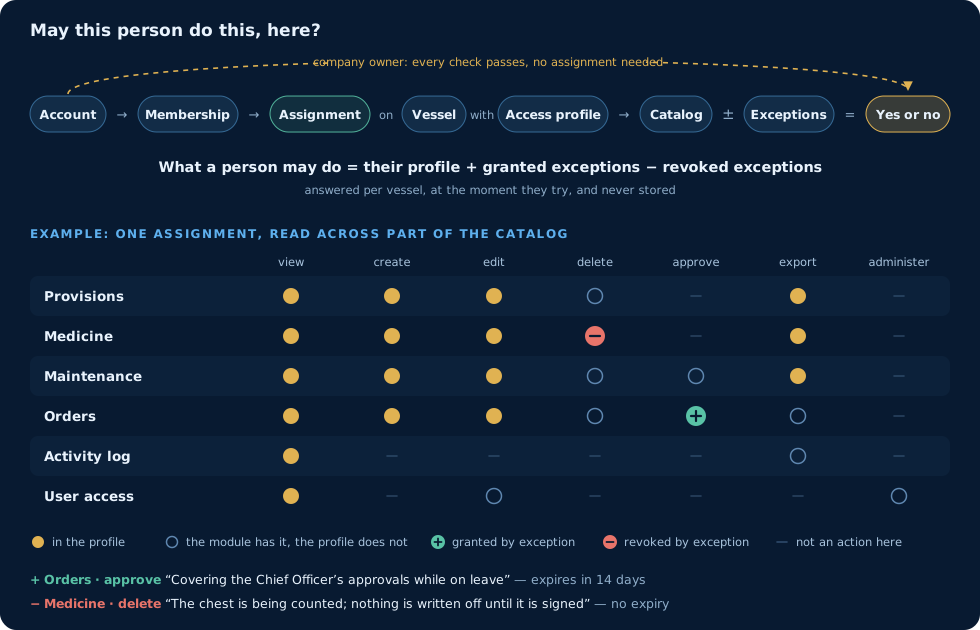
One question, one walk through the model.
When one person needs something their profile does not give, or must be kept from something it does, that is an exception: a single permission granted or taken away, with a written reason and, if wanted, an expiry date, so a temporary arrangement ends on its own. What a person may do is worked out at the moment they try — profile, plus grants, minus revokes — and never stored, so there is no copy that can fall out of step.
The database also stops anyone from promoting themselves. Nobody may appoint someone at or above their own rank, hand over a profile holding permissions they do not have, or grant a single permission they do not hold. Taking a permission away is always allowed: restricting is not escalating.
The access profiles and their permissions are proposals from me — in my capacity as a ship’s officer and developer — to a shipping company and its vessels. The same does not apply to the data model hierarchy, which is fixed for all companies.
Ole Andre Øren — Founder & Developer
One vessel at a time, and room for more
Seavo Nautiq is built for one vessel. Everything described here happens on board a single hull, and the platform is not a fleet management system in the usual sense.
Vessels in the same organisation can still see each other. One vessel asks for a link using the other vessel’s PIN, the other vessel approves it, and from then on each can view the other’s module overview on the Fleet page. It is a window across, not shared control: each vessel keeps its own records and its own access.
An organisation with several vessels is already part of the data model, where the company sits above its vessels. That is the foundation a fuller fleet overview will be built on.
Coordination, operations and logs
Crew coordination brings Participants, Voyages and Supplies together: the crew register, voyages with their route, dates and crew list, and what each crew member is issued along the way. Operations covers cargo stowage planned from the vessel’s own measurements, maintenance jobs followed through to done, orders priced and approved, reports with deviations and risk assessments, and research at sea — with Fleet putting several vessels on one screen.
All of it leaves a trace: an activity log of who changed what, with the value before and after, the audit trail of access changes, stock movements between locations, maintenance history and familiarisation records.
On the bridge, ashore and in the pocket
Seavo Nautiq is run from a desktop computer, a laptop or a tablet. The platform also has its own mobile app, better suited to crew members, which works alongside the platform and also standalone, without it.
Modules
Seavo Nautiq organises inventory, crew coordination and operations into separate parts called modules. Provisions is one module, crew supplies is another, and the voyage itself is a third. Each kind of task has its own place on the platform: a full page where the task is opened, carried out and closed.
Because each module stands on its own, it can be developed into a better version, one that suits work at sea more closely, without disturbing the rest. New modules can be added, and existing ones can be merged or removed when that serves the vessel better. That is why they are called modules.
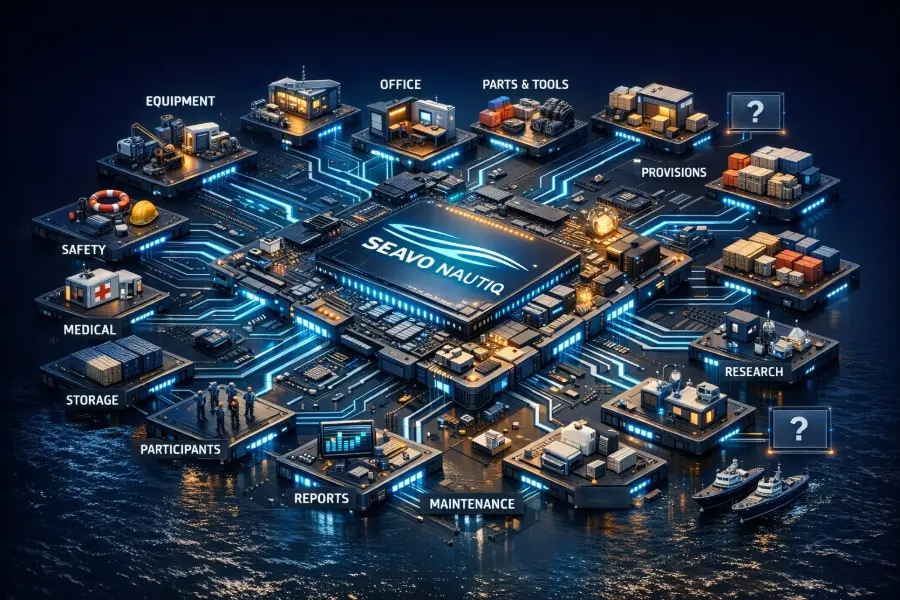
The platform at the centre, with some of its modules connected to it. The slots marked with a question mark are room for modules still to come.
The platform
Seavo Nautiq
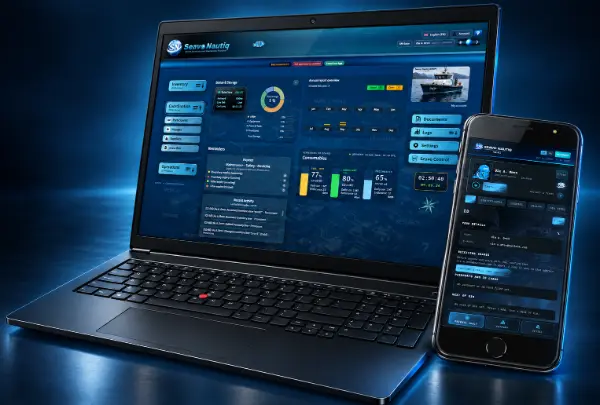
The full workspace, in a browser on the bridge or ashore. Everything the vessel holds and everything it does, on one screen.
- Inventory, maintenance, orders and reports in one place
- Owner, officers and crew each get their own view
- Every movement logged, with the trail to show for it
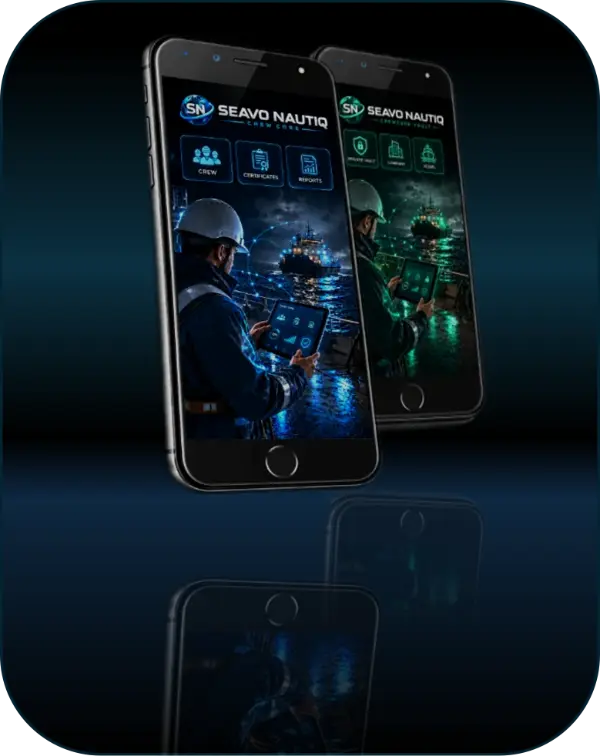
On the phone
CrewCore Vault
The same platform, in a pocket. Crew log the job where the job happens, and it is on the vessel record before anyone is back at a desk.
- A private vault for personal documents and certificates
- Observations and jobs logged straight from the deck
- Keeps working offline, syncs when the signal returns
How the modules work together
One hub, two domains — every module contributes to the same operational picture.
Every module in Seavo Nautiq is a workspace of its own — but none of them stand alone. What you register in the Inventory modules becomes the working data for Operations: an equipment line turns into a maintenance job, a minimum level turns into an order, and a completed task turns into a report.
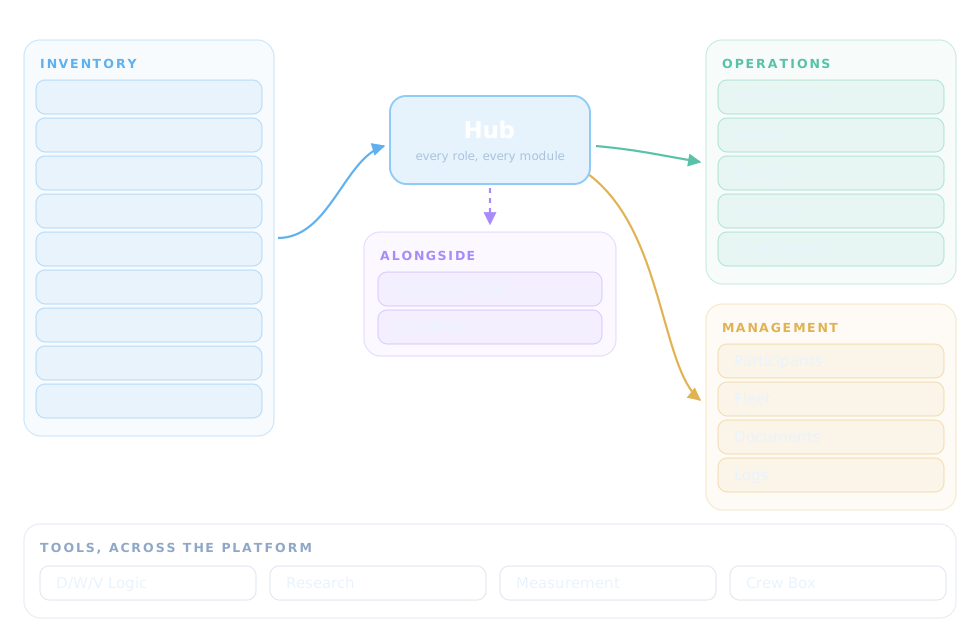
The Color Diagram shows how the modules generally interact
Reading the diagram
Read it from the hub outwards. The main hub gives every role access to its modules. Inventory lines carry quantity, limits, status and location, while Operations modules consume and enrich that data — Maintenance pulls Parts & Tools, Orders restock Provisions and Supplies, and Reports collect the trail across all of them. CrewCore and CloudFish work alongside: the crew app for quick logging on deck, the assistant for guidance inside the platform.
Existing and future potential
This structure is what lets the platform grow. New modules dock onto the same hub and immediately understand the ones already there, and coming application versions — the web platform and the CrewCore app — share the same data model. Every module and app version added multiplies the value of what is already on board.
Who can benefit
Seavo Nautiq is built to support practical maritime work — on board and ashore — without forcing vessels into rigid or generic systems.
Working vessels
Workboats, fishing vessels and ships of all sizes that need a clear, shared overview of inventory, maintenance and daily operations.
Shore-based roles
Shipping companies, fleet operators, ports, warehouses and terminals that require insight, coordination or follow-up related to vessel activity.
Education & training
A potential non-mandatory support tool for maritime education, helping students understand real-world vessel structure and workflows.
Book a Seavo Nautiq Demo
The demonstration is adapted to your company by presenting functions and identifying the need for inventory management and operational requirements.
The demo is a demonstration of Seavo Nautiq to see how the platform can support vessel operations, crew coordination, inventory control, documentation and communication between vessels and shore-based teams.
Seavo Nautiq is under active development
Recommended participants
To evaluate the platform properly, we recommend including representatives from relevant operational areas:
- Managing Director or Operations Manager
- Technical Manager
- DPA or HSEQ Manager
- Crew or HR Manager
- IT and Information Security Manager
- Captain, Chief Officer or Chief Engineer
- Purchasing or Procurement Manager
The participants can be selected according to the purpose of the demonstration.
Pilot programme
Following the demonstration, selected customers may be invited to test Seavo Nautiq through a controlled pilot programme involving one vessel, department or operational workflow.
The pilot may include:
- Initial system configuration
- User and access setup
- Vessel, crew and inventory data
- Operational testing
- User feedback and issue reporting
- Security and permission checks
- Review meetings
- Final pilot evaluation
BOOK A DEMO
Soon
?
This checklist helps your organisation prepare for a Seavo Nautiq demonstration and evaluate whether the platform is suitable for a controlled pilot programme.
Product Philosophy
Seavo Nautiq is built around how vessels actually work – not how software thinks they should.
Life at sea is practical, time-sensitive and often unpredictable. Systems used on board must support this reality, not complicate it. Seavo Nautiq is designed to fit into existing routines, not replace them with rigid processes. The platform is guided by a few core principles:
Clarity before complexity
Information should be easy to read, understand and act on. Seavo Nautiq prioritizes clear visual structure and meaningful overviews, so users can quickly see what matters without digging through layers of menus or data.
Flexibility without chaos
Every vessel works differently. Seavo Nautiq allows structure where needed and simplicity where preferred, letting crews adjust tables, views and workflows without losing control or consistency.
Built for shared responsibility
On a vessel, work is distributed. Owners, officers and crew have different responsibilities and perspectives. Seavo Nautiq is designed so each role sees what is relevant to them, while still contributing to the same shared operational picture.
Support real work, not paperwork
The goal is not to create more reporting, but to make daily tasks easier to log and follow up. Inventory updates, maintenance notes and reports should be quick to register and useful afterward — not an extra burden.
Onboard first, scalable later
Seavo Nautiq is designed to work reliably in the environment it is used: on board, sometimes offline, often under time pressure. At the same time, the platform is structured to grow into fleet use and connected services without changing how users work day to day.
Evolve with the vessel
Seavo Nautiq is not a finished product, but a growing platform shaped by real feedback from real users. The philosophy is to improve through use, refine through experience, and prioritize features that solve actual operational problems.
Ole Andre Øren — Founder & Developer
© 2026 Seavo Nautiq